



A lightweight and modular front-end framework.
UIkit is a lightweight and modular front-end framework for developing fast and powerful web interfaces. It comes with a wide range of reusable and combinable components. All UIkit classes are namespaced, so they won't interfere with other frameworks and extensions you might be using. Here's an overview of the different UIkit components, which you can easily modify using the customizer.
<div class="myclass">...</div>text-primary
text-success
text-warning
text-danger
mark element
qinsidea q element
abbr element
dfn element
h1
h2
h3
h4
h5
h6
Lorem ipsum dolor.
Someone famous
Info message
Success message
Warning message
Danger message
- List item 1
- List item 2
- List item 3
- List item 1
- List item 2
- List item 3
| Table | Heading |
|---|---|
| Table | Data |
| Table | Data |
- Description lists
- Description text.
- Description lists
- Description text.
Headline
Lorem ipsum dolor sit amet, consectetur adipisicing elit, sed do eiusmod tempor incididunt ut labore et dolore magna aliqua. Ut enim ad minim veniam, quis nostrud exercitation ullamco laboris nisi ut aliquip ex ea commodo consequat. Duis aute irure dolor in reprehenderit in voluptate velit esse cillum dolore eu fugiat nulla pariatur. Excepteur sint occaecat cupidatat non proident, sunt in culpa qui officia deserunt mollit anim id est laborum.
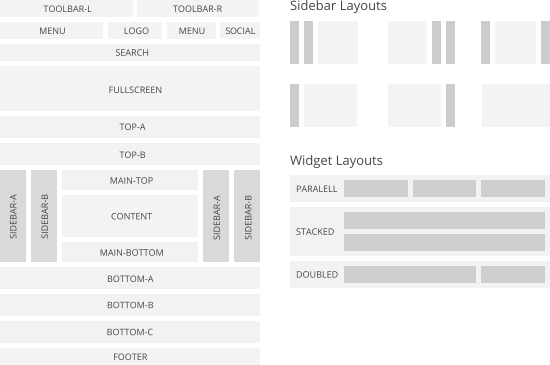
Warp comes with a sophisticated layout system to create any kind of sidebar or widget layout. You can easily manage the sidebar's positions and widths in the theme administration. Widgets can have different styles and be placed in any position offered by this theme. Each position has its own layout. You can align widgets side-by-side, stack them or choose your own grid layout. Show or hide widgets on mobile devices, while the grid adapts perfectly to your layout.
YOOtheme is a well-known template and extension provider for Joomla and WordPress who helps you to create professional websites. But to make your website or interface design a real eye-catcher there was one thing missing: Icons! Icons are an essential tool to simplify user interfaces and today almost every major website uses icons to highlight important parts in their content.
-
 Building Icons
 -
 Hosting Icons
 -
 Tool Icons
 -
 Shipping Icons
 -
 E-Commerce Icons
 -
 Space Icons
Features
PNGs in 8 Sizes
From 16x16 to 512x512 pixels.
Scalable vector sources
Customizable PDF vector files.
Pixel perfect design
Handcrafted every size.
YOOtheme Icons. Beautiful and handcrafted icons for web and print projects. Visit Website

Widgetkit
Widgetkit 2 is the next generation toolkit for WordPress and Joomla. It provides a simple and user-friendly way to enrich your website experience with grids, switchers, slideshows and much more.
Widgets
Currently available widgets

Slideshow

Grid

Grid Stack

Switcher

Map
How to use
Use a shortcode to display your widget anywhere on your website
Start in the editor
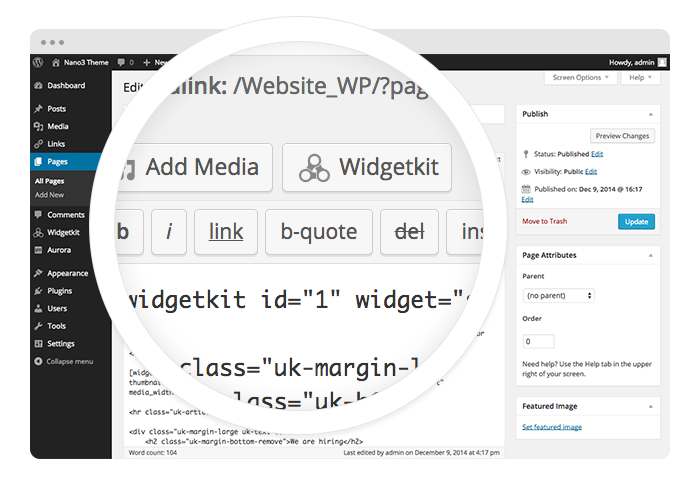
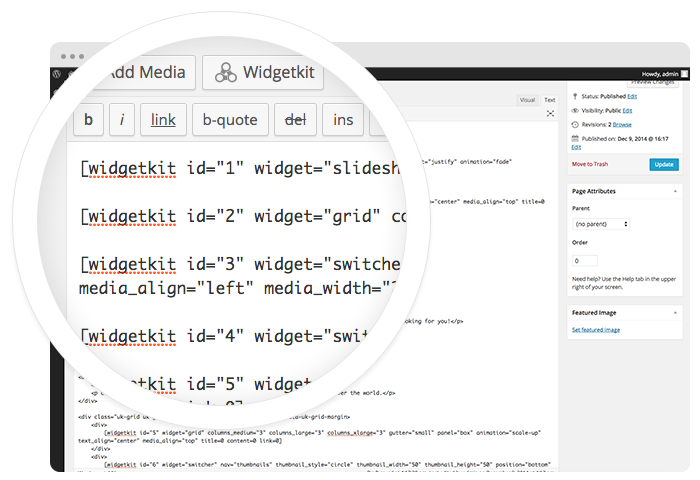
To get started, click on the Widgetkit button in your CMS edit view. Now choose the widget you would like to render, for example Grid. To create content for your widget, hit the New button and select the content type, for example custom.
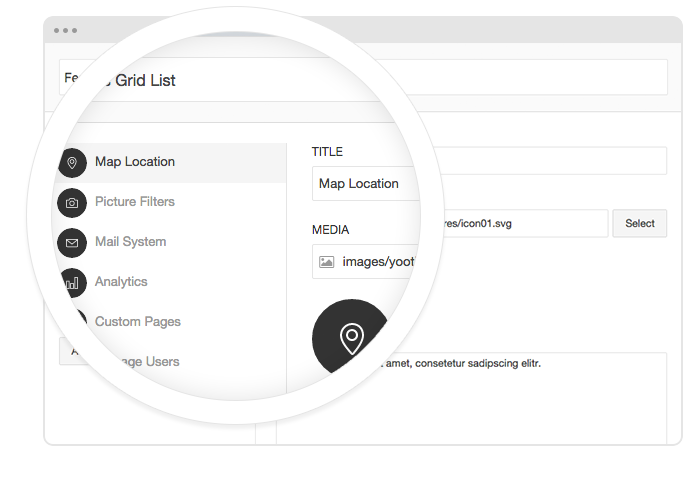
Explore the Interface
To create your content, you can add single content items by using Add Item. Alternatively you can use Add Media to select multiple items at once through the media library or manager of your CMS. Don’t forget to hit Save after you have created your items and then Close.
Using the shortcodes
To finalize your widget, hit Insert. Now you will see a shortcode with the ID and settings of your widget. If you have changed the default settings of your widget, the updated settings will be added to the shortcode. To select a different widget, click inside the shortcode and hit the Widgetkit button. Now click Change Widget.
Features
All widgets make use of modern web technologies
- All widgets are fully responsive
- Use shortcodes to show widgets anywhere
- Supports touch gestures for mobile devices
- Clean and lightweight code
- User friendly interface
- Built with the UIkit framework
Social Icons
Use the modifier .uk-icon-button class to create an icon button.
Here is a little code example how to add them:
<a href="/" class="uk-icon-button uk-icon-twitter"></a>
<a href="/" class="uk-icon-button uk-icon-facebook"></a>
<a href="/" class="uk-icon-button uk-icon-google-plus"></a>
Here is an overview of all icons provided by Font Awesome.
Socialbar
Venice Theme provides an additional Socialbar Position, integrated nicely into the header. You can modify it completely to add your own icons or apply a different toggler. Here's an example of how we applied the Toggle component from UIkit to the Socialbar.
<a class="tm-social-toggle" data-uk-toggle="{target:'#tm-social-icons > li', animation:'uk-animation-slide-right'}">
    <i class="uk-icon-heart-o"></i>
</a>
<ul id="tm-social-icons" class="uk-list">
  <li class="uk-hidden"><a href="/" class="uk-icon-button uk-icon-github uk-margin-small-top"></a></li>
  <li class="uk-hidden"><a href="/" class="uk-icon-button uk-icon-twitter uk-margin-small-top"></a></li>
</ul>
Warp Framework
A fast and slick theme framework which is built on the latest web techniques like HTML5, CSS3 and PHP 5.3+
UIkit
A lightweight and modular front-end framework for developing fast and powerful web interfaces.
This theme is available for  Joomla and
  WordPress including the same features on each system.

Handcrafted Websites
Premium Themes


Web Applications
What makes us Unique
Mastering state of the art technologies.



Author
May 2, 2090 at 1:55 pm
Lorem ipsum dolor sit amet, consetetur sadipscing elitr, sed diam nonumy eirmod tempor invidunt ut labore et dolore magna.